JavaScript Functions Explained
In programming, we often repeat the same logic multiple times.
For example, imagine calculating the sum of two numbers in different places in a program.
Without functions:
let result1 = 10 + 5;
let result2 = 20 + 8;
let result3 = 7 + 3;
This approach works, but it quickly becomes repetitive.
JavaScript solves this problem using functions.
Functions allow us to write reusable blocks of code that can be executed whenever needed.
What is a Function?
A function is a reusable block of code designed to perform a specific task.
Example:
function add(a, b) {
  return a + b;
}
Here:
addis the function nameaandbare parametersthe function returns the sum
Calling the function:
console.log(add(5, 3));
Output
8
Instead of repeating logic, we can call the function multiple times.
Why Do We Need Functions?
Functions help us:
avoid repeating code
organize programs better
make code easier to read
reuse logic in multiple places
Example:
function greet(name) {
  console.log("Hello " + name);
}

greet("Gagan");
greet("Rahul");
greet("Amit");
Output
Hello Gagan
Hello Rahul
Hello Amit
Function Declaration
A function declaration defines a function using the function keyword.
Syntax
function functionName(parameters) {
  // code
}
Example
function multiply(a, b) {
  return a * b;
}

console.log(multiply(4, 5));
Output
20
Function declarations are the most common way beginners start writing functions.
Function Expression
A function expression stores a function inside a variable.
Syntax
let variableName = function(parameters) {
  // code
};
Example
let multiply = function(a, b) {
  return a * b;
};

console.log(multiply(4, 5));
Output
20
The function works the same way, but it is stored inside a variable.
Declaration vs Expression
| Feature | Function Declaration | Function Expression |
|---|---|---|
| Syntax | Uses function name() |
Stored in a variable |
| Hoisting | Can be called before definition | Cannot be called before definition |
| Usage | Common for general functions | Useful when functions are treated like values |
Example Comparison
Function declaration:
function greet() {
  console.log("Hello");
}

greet();
Function expression:
let greet = function() {
  console.log("Hello");
};

greet();
Both produce the same result.
Understanding Hoisting (High Level)
In JavaScript, some declarations are moved to the top of their scope during execution.
This behavior is called hoisting.
Because of hoisting, function declarations can be called before they appear in the code.
Example:
sayHello();

function sayHello() {
  console.log("Hello");
}
This works even though the function appears later.
Function Expression and Hoisting
Function expressions behave differently.
Example:
sayHello();

let sayHello = function() {
  console.log("Hello");
};
This will produce an error because the function is not available before the variable assignment.
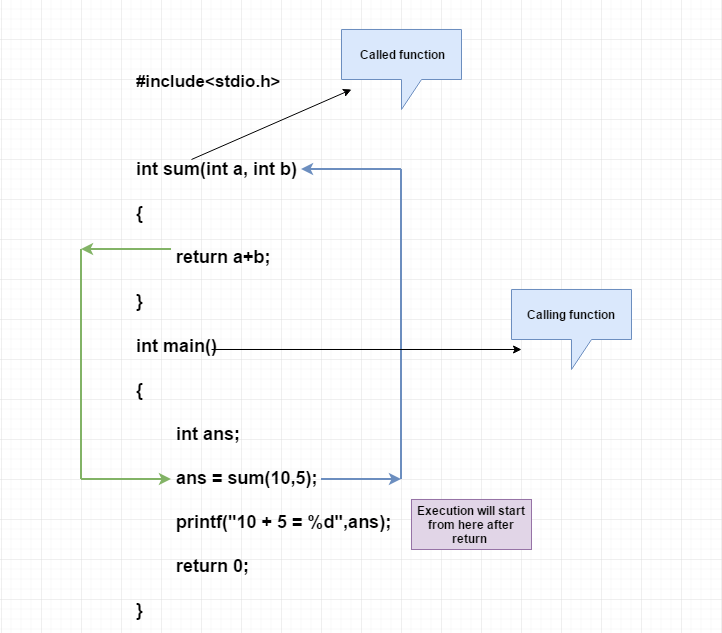
Simple Function Execution Flow


4
Execution steps:
Function is defined
Function is called
Parameters receive values
Code inside the function runs
Result is returned
When to Use Each Type
Use function declarations when:
writing general reusable functions
defining main program logic
organizing code clearly
Use function expressions when:
assigning functions to variables
passing functions as values
creating functions inside other functions
For beginners, function declarations are usually easier to understand.
Practical Example
function add(a, b) {
  return a + b;
}

console.log(add(10, 20));
Output
30
Practice Assignment
1 Write a Function Declaration
Create a function that multiplies two numbers.
Example:
function multiply(a, b) {
  return a * b;
}

console.log(multiply(4, 6));
2 Write the Same Logic Using Function Expression
let multiply = function(a, b) {
  return a * b;
};

console.log(multiply(4, 6));
3 Call the Functions Before Defining
Try this with the declaration:
multiply(3,4);

function multiply(a,b){
  return a*b;
}
Now try the same with function expression and observe the behavior.